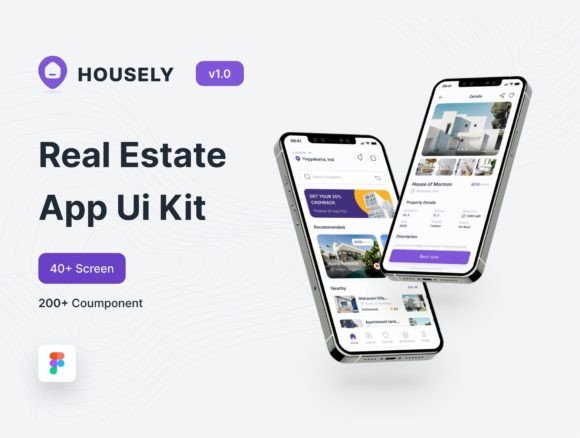
Housely UI Kit: Streamline Your Real Estate App Design
Imagine launching a real estate platform that feels both intuitive and visually polished from the very first interaction. For designers and entrepreneurs in the property market, the gap between a functional prototype and a professional, user-ready application often lies in the quality of the design assets. This is where a meticulously crafted resource like the Housely - Rent Real Estate App Ui Kit transforms the workflow, offering a foundation built on modern aesthetics and practical functionality. It’s not just about having screens to show; it’s about presenting a cohesive vision that builds trust and guides users effortlessly toward finding their next home.
A Modern Foundation for Property Platforms
Housely is more than a collection of screens; it's a design system tailored for the real estate sector. Its core appeal lies in its clean, contemporary aesthetic—a visual language that communicates clarity and reliability, two qualities paramount when users are making significant life decisions about where to live. The design leverages a light theme across its 45 pages, creating an airy, open feel that mirrors the spaciousness people seek in a home. This isn't a cluttered interface; strategic use of whitespace directs attention to property listings, essential details, and clear calls-to-action.
Built entirely in Figma, the kit embraces the platform's powerful variant features. This means interactive elements like buttons, cards, and navigation bars come with multiple states (default, hover, active, disabled) pre-configured. For a designer, this eliminates the tedious task of manually creating each variation, ensuring consistency and saving dozens of hours. The component-based structure allows you to swap out a "Featured Property" card for a "Recently Viewed" module with a simple drag-and-drop, maintaining design integrity throughout the process. It’s this thoughtful organization that makes the UI kit suitable for both rapid prototyping and final production-ready designs.
Practical Applications Beyond the App Screen
While the primary context is a mobile or web application for renting real estate, the value of a well-designed system extends far beyond a single use case. The typography, color palette, and iconography established within Housely can become the bedrock of an entire brand identity.
Consider a small property management startup. Using the UI kit as a starting point, they can extract the design principles to create a consistent presence across all touchpoints. The clean sans-serif fonts used for body text are perfect for readability on a website or in a blog post discussing market trends. The display font chosen for headlines can be adapted for a logo, ensuring the brand's digital face is recognizable. The color scheme can inform packaging for welcome kits for new tenants, social media graphics promoting open houses, and even print materials like flyers or business cards. The kit’s pixel-perfect design ensures that assets created in Figma translate smoothly to high-resolution screens and print outputs.
Building Visual Consistency and Trust
In a competitive market, visual consistency is a silent ambassador for professionalism. When a user navigates from an Instagram ad to a landing page and then into the app itself, a seamless visual experience reduces cognitive load and builds subconscious trust. Housely facilitates this by providing a well-layered and organized file structure. Every element is named logically, making it simple to locate a specific button style or a pricing table component.
This organization is crucial for teams. A developer can easily understand the hierarchy, a marketer can request specific assets with precision, and a designer can onboard new members quickly. The inclusion of supporting components—like status indicators for "Available," "Pending," or "Rented"—adds a layer of functional clarity that enhances the user experience. By using this system, you ensure that every piece of communication, whether it's an in-app notification or a banner on a partner website, speaks the same visual language, reinforcing brand recognition at every turn.
Tailoring the Kit to Your Unique Vision
A common pitfall with design kits is the risk of creating something that looks generic. Housely counters this by being exceptionally customizable. The variant system in Figma means you are not locked into a single style. You can adjust the corner radius of every card from sharp to rounded, change the primary accent color from a calming blue to an energetic green to match your brand's personality, and swap out the free amazing font included for another typeface from your brand guidelines.
The key is to approach the kit as a flexible template, not a finished product. Start by auditing the components. Do you need a more complex mortgage calculator? You can build it using the existing button and input field styles. Is your target audience luxury renters? You might increase the size of property images and introduce a more elegant serif font for headings to evoke sophistication. The kit provides the scalable grid and spacing system; your creativity provides the unique flavor. This adaptability makes it a powerful tool for creating everything from a rental aggregator app to a boutique agency's exclusive property showcase.
From Design Asset to Market-Ready Product
The journey from a Figma file to a live product is where many designs falter. Housely is constructed to smooth this transition. The pixel-perfect alignment and consistent spacing make handoff to developers more accurate, reducing back-and-forth revisions. The comprehensive nature of the 45 pages—which typically include onboarding flows, search filters, detailed listing views, user profiles, and payment screens—provides a complete user journey map.
For entrepreneurs and small business owners, this means you can present a clickable prototype to stakeholders or early users that feels authentic and functional. It allows for meaningful user testing on concepts like search usability or listing presentation before a single line of code is written. This practical, real-world utility is what elevates the UI kit from a mere collection of pretty screens to a strategic business tool. It helps you articulate your vision, validate ideas, and ultimately launch a digital product that meets modern user expectations for both form and function in the real estate space.