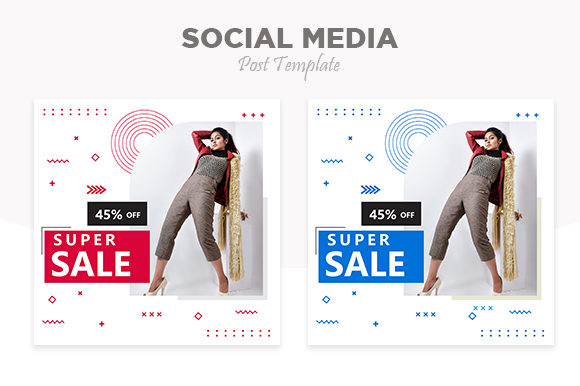
Mastering the Visual Feed: A Guide to Fashion Templates
There is a specific kind of frustration that hits you when you are staring at a blank Photoshop canvas at 11:00 PM, trying to force a "Summer Sale" graphic to align with your brand aesthetic. You have the photos, you have the copy, but you lack the structural cohesion that makes a professional feed look effortless. For fashion brands, lifestyle bloggers, and digital marketers, visual consistency is not just a preference; it is the currency of credibility. When you are managing a content calendar that includes Instagram Stories, feed posts, and promotional banners, starting from scratch for every single asset is a workflow bottleneck that leads to burnout. This is where the utility of a robust, vector-based design system comes into play, specifically one built around the concept of a Fashion Social Media Post Template. It bridges the gap between a raw idea and a polished marketing asset, allowing you to focus on the message rather than the pixel-perfect alignment of text boxes.
The Anatomy of a High-Functioning Design Asset
When evaluating a Fashion Social Media Post Template and its associated editable banners, the value lies in the architecture of the file, not just the pretty pictures on the surface. A common pitfall for designers and small business owners is purchasing assets that look good in the preview but are a nightmare to edit. A truly professional template package should prioritize modularity. This means the design is broken down into organized layers, allowing you to isolate elements without disrupting the rest of the composition.
The specifications of the asset matter immensely. A 2000×2000 pixel resolution is the current sweet spot for social media, offering enough density for high-definition displays on retina screens while remaining manageable for file storage. However, the "magic" of modern templates lies in features like Smart Object Replacement. For the uninitiated, a Smart Object in Photoshop is essentially a container within a layer. When you double-click it, you can paste your own image or artwork, save it, and the template automatically applies the necessary distortions, shadows, and lighting effects to your image. If you are working on a fashion lookbook or a product drop, this feature alone saves hours of manual warping and masking.
Furthermore, the inclusion of vector formats like EPS files ensures that your marketing materials are resolution-independent. Whether you are scaling a design for a massive storefront poster or shrinking it down for a mobile web banner, vectors ensure the lines remain crisp. This scalability is vital for a cohesive brand identity, ensuring your typography and graphic elements look identical across a tiny favicon and a billboard.
From Instagram Stories to Editorial Layouts: Real-World Application
The versatility of a comprehensive template kit extends far beyond the standard Instagram square. Consider the lifecycle of a fashion brand campaign. You might start with a teaser on Instagram Stories using vertical formatting. As the launch date approaches, you move to the main feed with square promotional posts. Simultaneously, you might need website banners for a landing page and email headers for a newsletter blast.
A well-crafted package provides the versatility to handle these different dimensions without losing the visual thread. Here is how these assets typically integrate into different facets of a digital strategy:
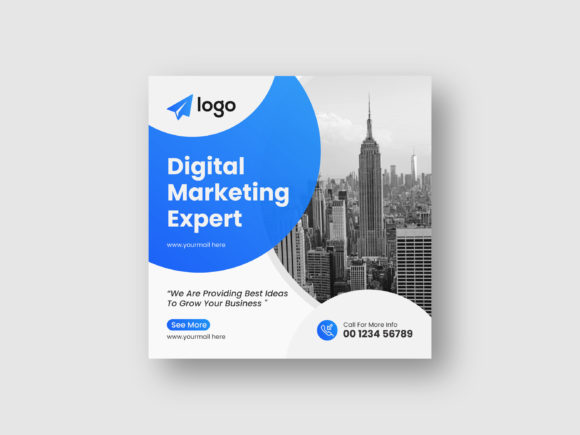
- Social Media Graphics: The primary use case. These templates are designed to stop the scroll. By using pre-set grids and typography hierarchies, you ensure that your call to action (CTA) is always readable, even on small mobile screens.
- Digital Marketing & Banners: Beyond social, these designs translate perfectly to display ads. The organized layers allow you to quickly swap out copy for A/B testing different headlines without redesigning the whole banner.
- Web Design Elements: Consistency between your social presence and your website is crucial. You can extract elements from the PSD files—such as background textures, button styles, or icon sets—to style your Shopify or WordPress site.
- Print Materials: Because of the high resolution and vector capabilities, these templates can be repurposed for lookbooks, hang tags, or event invitations. The transition from digital to print is seamless when the source files are high quality.
- Packaging and Merchandise: For those selling physical products, the vector elements can be adapted for box designs or tote bag prints, ensuring that the product in the customer's hand matches the advertisement they saw online.
Typography and Visual Hierarchy in Fashion Branding
In the fashion industry, typography is not just about legibility; it is about attitude. A template that utilizes a Free Font is a practical starting point, but the real power comes from understanding the typeface's personality. Most high-end fashion templates use a mix of Serif and Sans Serif fonts to create contrast. A classic Serif font often conveys tradition, elegance, and editorial prestige (think Vogue or Harper’s Bazaar), while a clean Sans Serif suggests modernity, minimalism, and accessibility.
When you open the editable text layers, you are presented with a visual framework. However, you should view this as a suggestion rather than a rigid rule. If your brand identity is more playful and bohemian, you might swap the suggested modern sans-serif for a Script Font or a Handwritten Font. The key is to maintain the Visual Hierarchy established by the template. The headline should remain the focal point, the sub-headline should support it, and the body copy should be secondary.
Readability is paramount, particularly when overlaying text on images. Good templates use semi-transparent overlays, solid color blocks, or drop shadows to separate text from the background noise. When editing, ensure that your chosen text color has sufficient contrast against the background. A common mistake is using light grey text on a white photo background, which looks chic on a large monitor but becomes invisible on a phone screen in bright sunlight.
Streamlining Workflow for the Busy Entrepreneur
For the small business owner or the solo content creator, time is the most finite resource. The technical features listed in a professional template—Organised Layers, Easy to Edit, and Smart Object Replacement—are not just buzzwords; they are workflow solutions.
Imagine you are launching a new collection. You have 20 product photos and need to create 20 distinct posts. Without a template, this is a multi-day project. With a template system, you simply open the file, locate the Smart Object layer for the image, paste your photo, save, and export. You can batch-process an entire week's worth of content in an afternoon.
Furthermore, the use of Organised Layers means you are not hunting through "Layer 1, Layer 1 copy, Layer 1 copy 2." Professional assets group elements logically: "Background," "Text," "Graphics," "Image Placeholders." This structure is especially helpful if you are collaborating with a team or outsourcing the editing to a freelancer. It reduces the learning curve and ensures that the final output matches your brand guidelines.
Strategic Customization: Making the Template Your Own
The ultimate goal of using a Fashion Social Media Post Template is not to look like everyone else who bought the same kit, but to use the kit as a foundation for your unique brand voice. The "Editable" nature of these files allows for deep customization.
Start by infusing your brand colors. Do not just use the default palette provided in the file. Use the color picker to input your specific Hex codes. This single change transforms a generic template into a branded asset. Next, look at the Font Pairing. If the template pairs a bold display font with a light body font, maintain that ratio but switch to your brand’s typeface. This keeps the layout balanced while reinforcing your specific visual identity.
Consider the negative space as well. Fashion design often relies on "breathing room." If your images are busy or colorful, you may want to strip back some of the decorative vector elements included in the template to let the photography shine. Conversely, if you are posting text-only announcements or quotes, utilize the graphic borders and abstract shapes provided to add visual interest to the flat canvas.
Finally, always consider the commercial aspect. When using templates that include fonts and graphics, it is vital to understand the licensing. A reputable template will clearly state that the assets are cleared for commercial use, meaning you can use the final designs for your business marketing without legal hiccups. This peace of mind allows you to focus entirely on the creative process, knowing that your marketing assets are built on a solid, legal, and professional foundation.